
Introduction
Image source : https://www.packetswitch.co.uk/
Ollama is an open-source tool designed to help developers run and develop large language models (LLMs) locally on their machines. It enables efficient AI model execution without relying on cloud-based services, ensuring cost-effectiveness, privacy, and performance.
🔗 Download Ollama: Ollama Official Website
Ollama Commands
1. Running a Model:
$ ollama run <model-name>
- Checks if the model is available locally; if not, it pulls it from the Ollama model registry and run the model
2. Starting the API Server:
$ ollama serve
- Runs the Ollama API on port 11434.
3. Verifying Model Integrity:
$ ollama check <model-name>
- Uses SHA-256 digest to confirm authenticity.
4. Listing Available Models:
$ ollama list
- Displays the locally available models.
5. Pulling a Model from the Registry:
$ ollama pull <model-name>
- Downloads a model from the Ollama registry.
6. Pushing a Model to the Registry:
$ ollama push username:<model-name>
- Uploads a custom model to the Ollama registry.
7. Creating a Custom Model:
$ ollama create my_custom_model -f ./Modelfile
- Builds a custom model based on the configuration in a Modelfile.
8. Check avilable commands:
$ /?

Available Commands:
  /set            Set session variables
  /show           Show model information
  /load <model>   Load a session or model
  /save <model>   Save your current session
  /clear          Clear session context
  /bye            Exit
  /?, /help       Help for a command
  /? shortcuts    Help for keyboard shortcuts
REST API Endpoints
Ollama provides REST API endpoints to interact with models programmatically.
Ollama REST API endpoints :
POST /api/generate   # Generates responses (supports streaming option).
POST /api/chat       # Chat Interaction - Handles chat-based interactions.
GET /api/models      # Returns a list of installed models.
POST /api/pull       # Pulls a model from the Ollama registry
POST /api/push.      # Uploads a locally built model to the Ollama registry.
GET /api/status.     # Returns the current status of the running Ollama API.
Creating and Managing Custom Models
Creating a Custom Image
To create a custom model, follow these steps:
- Create a Modelfile with the necessary configurations:
FROM BASE_MODEL:TAG
PARAMETER temperature 0.2
SYSTEM "You are a helpful assistant."
MESSAGE "Welcome to Ollama!"
- Build the model:
$ ollama create my_custom_model -f ./Modelfile
- Pushing a Custom Model to the Registry
$ ollama push my_custom_model
- This command uploads the locally built model to the Ollama registry.
Pulling a Model from the Ollama Registry
$ ollama pull username:my_custom_model
- Downloads and installs a model from the Ollama registry for local use.
Using Ollama with Python
Ollama can be integrated with Python to generate AI-powered responses. Below is an example using the requests library:
import ollama

response = ollama.generate(
    model="deepseek-r1",
    prompt="What is Deepseek?"
)

print(response["response"])
- This script sends a request to the Ollama API running locally, generates a response using the specified model, and prints the output.
Setting Up OpenWebUI with Ollama
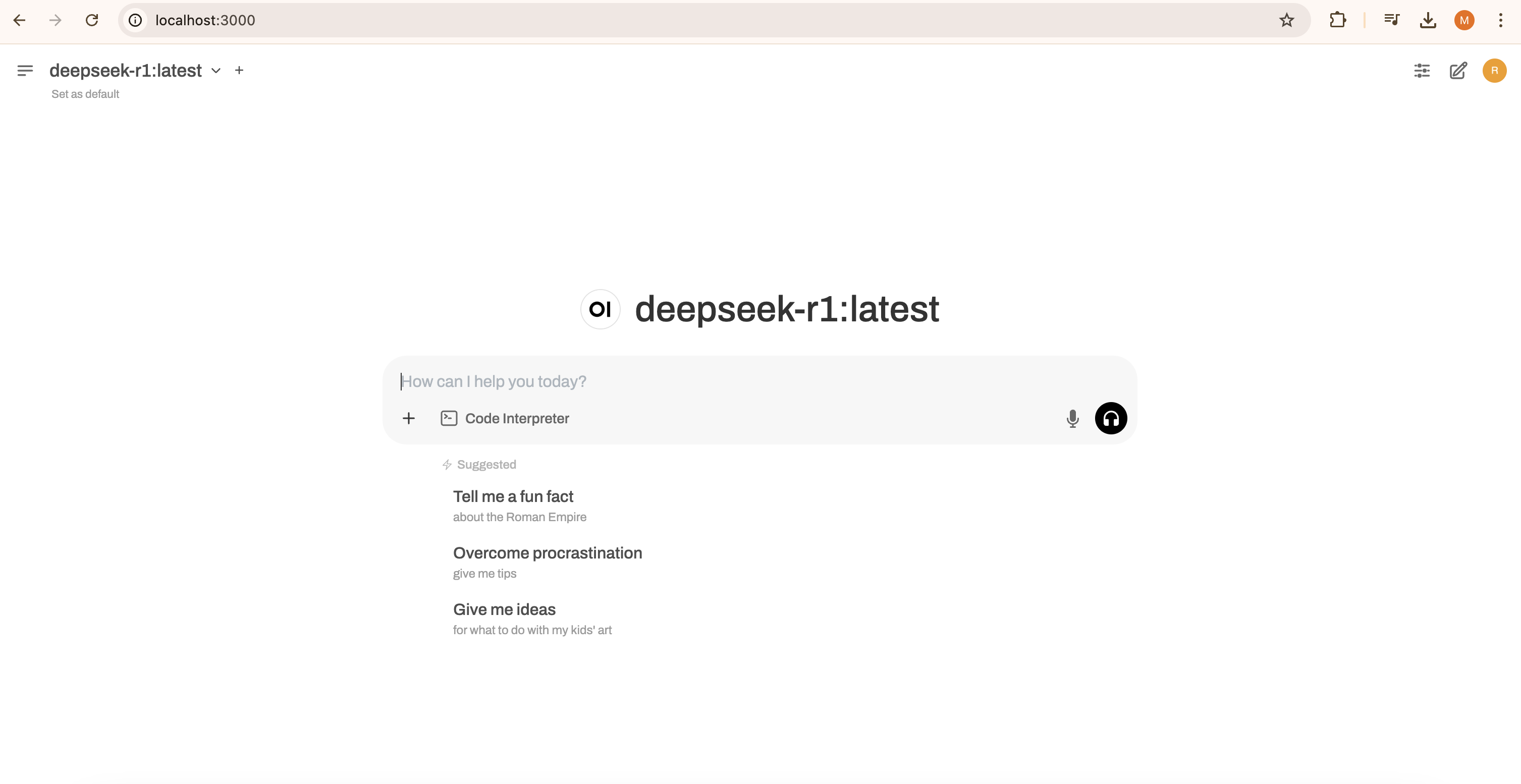
OpenWebUI is a user-friendly interface that enhances the experience of interacting with LLMs like Ollama.
Running OpenWebUI with Docker
You can easily set up OpenWebUI using Docker with the following command:
$ docker run -d --name open-webui -p 3000:3000 -e OLLAMA_BASE_URL=http://localhost:11434 --restart always ghcr.io/open-webui/open-webui:main
This runs OpenWebUI as a Docker container and connects it to your local Ollama instance.
Access OpenWebUI at
http://localhost:3000.
Conclusion :

Ollama provides a powerful way to run LLMs locally, ensuring privacy, performance, and cost-effectiveness. With its easy-to-use CLI commands, REST API support, Python integration, and OpenWebUI interface, it’s a great tool for developers looking to build AI applications without relying on cloud-based services.
🚀 Ready to explore Ollama? Download it today and start running your own AI models locally!
Connect with me on Linkedin: Raghul M
💬 Have questions or feedback? Drop them in the comments below!
About the author
- I'm the founder of CareerPod, a AI Inference Engineer at Red Hat, MLOps , Python Developer, Cloud & DevOps Enthusiast, AI/ML Advocate, and Tech Enthusiast. I enjoy building projects, sharing valuable tips for new programmers, and connecting with the tech community. Check out my blog at Tech Journal.
Comments
Join the discussionNo comments yet. Be the first to comment.
